Generowanie pakietu z dokumentami finansowymi
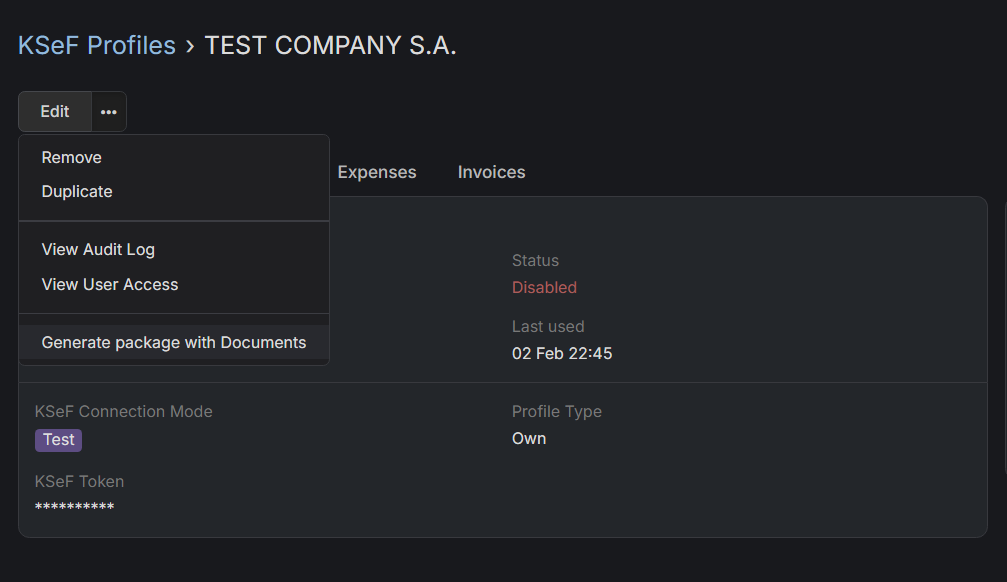
Jak pobrać dokumenty finansowe z poprzedniego miesiąca?
- Przejdź do Profili KSeF.
- Wybierz profil KSeF, dla którego chcesz wygenerować pakiet z dokumentami.
- Kliknij na ikonę trzech poziomych kropek, obok przycisku Edytuj i wybierz opcję
Eksportuj fakturyz menu rozwijanego. - Wybierz okres, z którego chcesz pobrać faktury, domyślnie ustawiony jest na jeden miesiąc. Możesz również wybrać, czy chcesz pobrać tylko wydatki czy faktury.
- Kliknij na Eksportuj
Będziesz powiadomiony w powiadomieniach EspoCRM, gdy pakiet będzie gotowy. Będzie tam również link do pakietu.