How to use certificates for authorization?
How to generate KSeF certificate?
You'll need two certificates!
Please keep in mind that you'll need two certificates from KSeF.
Authentication: A certificate used for authentication in the system.
Offline: A certificate used solely to verify the authenticity of the issuer and the integrity of the invoice in offline mode.
To generate a new certificate, please log in to the proper environment:
- Production - https://ap.ksef.mf.gov.pl/web/
- Demo - https://ap-demo.ksef.mf.gov.pl/web/
- Test - https://ap-test.ksef.mf.gov.pl/web/
Go to Certificates section and request new certificate. Please make sure that you choose proper type (Authentication/Offline).
You'll be notified in EspoCRM notifications when package will be ready. There will be also a link to a package.
How to add certificate KSeF Profile to EspoCRM?
- Go to Administration section.
- Search for "KSeF Settings" and click on it.
- Choose KSeF Profile for which you want to add new certificate.
- Click on Edit button.
- Change authorization type to
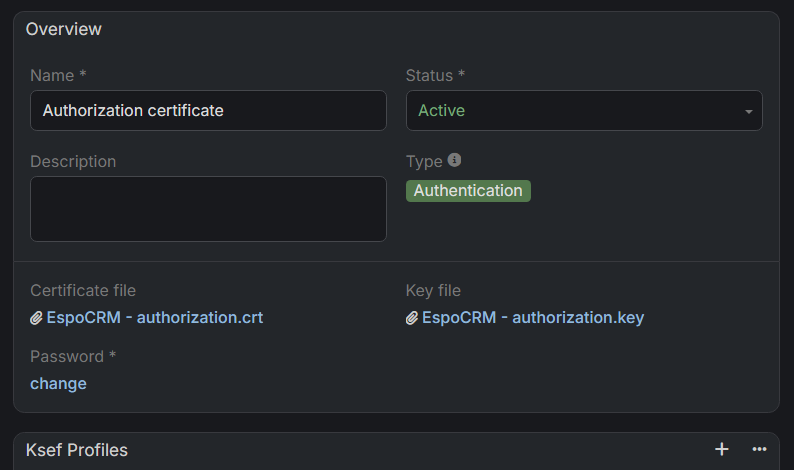
Certificate. - Link proper certificate to proper field. If you didn't uploaded certificate to EspoCRM yet, click on arrow button in a link field and click on button to create new KSeF Certificate. There you'll be able to upload certificate, key files and also to provide a password. Click save to link certificate to Ksef Profile.
- Do the same thing for second type of certificate.
You can link one certificate to multiple KSeF Profiles. Before you start using it, please make sure that Certificate status is set to Active.